---
title: Track the work in Tasks
description: Create tasks in AppVentory from renewals, overlaps and Agent findings or from scratch, assign them, set them to repeat and track them in Tasks Management.
---
[Skip to content](https://support.appventory.com/en-us/track-work-in-tasks#main-content)
[](https://support.appventory.com/?hsLang=en-us)
- [Product Update](https://support.appventory.com/en-us/release-notes)
- [Academy](https://academy.appventory.com/app)
- [Webinars](https://academy.appventory.com/app/webinars)
Open main navigation
Close main navigation
- [Product Update](https://support.appventory.com/en-us/release-notes)
- [Academy](https://academy.appventory.com/app)
- [Webinars](https://academy.appventory.com/app/webinars)
- [Contact us](https://24182720.hs-sites.com/submit-a-ticket)
[Contact us](https://24182720.hs-sites.com/submit-a-ticket?hsLang=en-us)
How can we help you?
- There are no suggestions because the search field is empty.
1. [AppVentory Knowledge Base](https://support.appventory.com/en-us?hsLang=en-us)
2. [For Businesses](https://support.appventory.com/en-us/for-businesses?hsLang=en-us)
3. [Run your stack](https://support.appventory.com/en-us/for-businesses?hsLang=en-us#run-your-stack)
# Track the work in Tasks
## Every finding in AppVentory can become a task with an owner and a date. Tasks is where they live.
###### 2 minutes per task
#### What you get
A finding with a name and a date on it. Most AppVentory screens offer **Create Task**; **Tasks** in the sidebar is where they all end up.
#### Where tasks come from
- **Renewals** — row menu → **Create Task**
- **Overlapping Apps** — **Create Task** on a group
- **Cost Savings** opportunities and the **Agent** feed (choose **AppVentory Tasks** as an Agent action)
- From scratch — **Tasks** → **Create Task**
#### Steps
1. Go to **Tasks** and click **Create Task**.
2. Enter a **Task title** and, for advisors, the **Associated client**.
3. Choose **Assigned to** and write the description.
4. Set the due date, the status (**To-do**) and a priority.
5. Switch on **Set to Repeat this task** for routines — the monthly review, the quarterly audit.
6. Click **Create Task**.
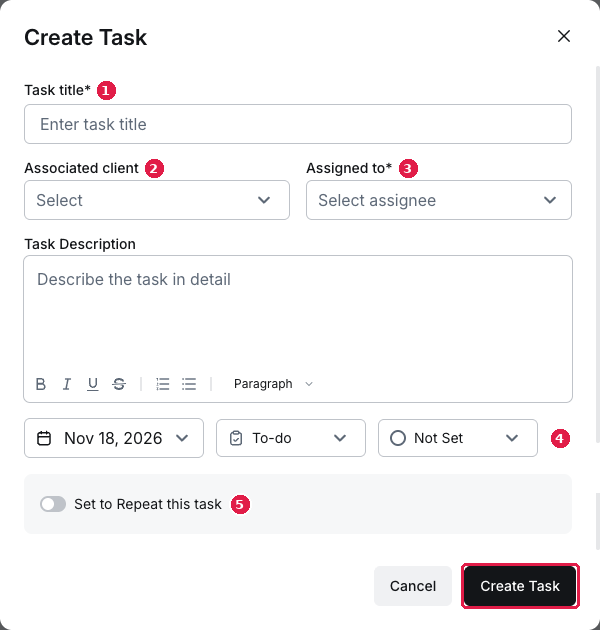
*The Create Task dialog with title, associated client, assignee, due date and the repeat toggle*
#### Where it is not
Tasks is a practice and My Business screen. Inside a client workspace there is no Tasks menu — a client's tasks sit on their record's **Tasks** tab in My Practice.
#### What you've unlocked
Next: **Your monthly 15 minutes**
*Advising clients? See [Track client work in Tasks](https://support.appventory.com/track-client-work-in-tasks?hsLang=en-us).*
- [AppVentory](https://support.appventory.com/en-us/appventory?hsLang=en-us#main-content)
- [Integrations](https://support.appventory.com/en-us/appventory?hsLang=en-us#integrations)
- [For Businesses](https://support.appventory.com/en-us/for-businesses?hsLang=en-us#main-content)
- [Start here](https://support.appventory.com/en-us/for-businesses?hsLang=en-us#start-here)
- [Connect your data](https://support.appventory.com/en-us/for-businesses?hsLang=en-us#connect-your-data)
- [Build your app list](https://support.appventory.com/en-us/for-businesses?hsLang=en-us#build-your-app-list)
- [See your spend](https://support.appventory.com/en-us/for-businesses?hsLang=en-us#see-your-spend)
- [Find savings and risks](https://support.appventory.com/en-us/for-businesses?hsLang=en-us#find-savings-and-risks)
- [Report what you found](https://support.appventory.com/en-us/for-businesses?hsLang=en-us#report-what-you-found)
- [Run your stack](https://support.appventory.com/en-us/for-businesses?hsLang=en-us#run-your-stack)
- [Routines](https://support.appventory.com/en-us/for-businesses?hsLang=en-us#routines)
- [For advisors](https://support.appventory.com/en-us/for-advisors?hsLang=en-us#main-content)
- [AI Agents](https://support.appventory.com/en-us/for-advisors?hsLang=en-us#ai-agents)
- [Start here](https://support.appventory.com/en-us/for-advisors?hsLang=en-us#start-here)
- [Connect your practice and clients](https://support.appventory.com/en-us/for-advisors?hsLang=en-us#connect-your-practice-and-clients)
- [Your portfolio](https://support.appventory.com/en-us/for-advisors?hsLang=en-us#your-portfolio)
- [Client spend and savings](https://support.appventory.com/en-us/for-advisors?hsLang=en-us#client-spend-and-savings)
- [Client reports and conversations](https://support.appventory.com/en-us/for-advisors?hsLang=en-us#client-reports-and-conversations)
- [Client renewals](https://support.appventory.com/en-us/for-advisors?hsLang=en-us#client-renewals)
- [Grow advisory revenue](https://support.appventory.com/en-us/for-advisors?hsLang=en-us#grow-advisory-revenue)
- [Inside a client’s workspace](https://support.appventory.com/en-us/for-advisors?hsLang=en-us#inside-a-clients-workspace)
- [Routines](https://support.appventory.com/en-us/for-advisors?hsLang=en-us#routines)
- [Admin and troubleshooting](https://support.appventory.com/en-us/admin-and-troubleshooting?hsLang=en-us)
- [Trust and security](https://support.appventory.com/en-us/trust-and-security?hsLang=en-us)
[](https://appventory.com?hsLang=en-us)
[mailto:email@email.com](mailto:email@email.com)
Copyright © 2026, AppVentory
Can’t find what you’re looking for?
Let us help you right now!
[Submit a Ticket](https://support.appventory.com/submit-a-ticket?hsLang=en-us)
[](https://www.linkedin.com/company/appventory/) [](https://www.youtube.com/@AppVentory-p5/videos)
Contact us
[hello@appventory.com](mailto:hello@appventory.com) [+1 (206) 338-6633](tel:+12063386633)
[For Accountants & MSPs ](https://www.appventory.com/for-accountants)
Solutions
[Grow Your Practice](https://www.appventory.com/solutions/for-practice/grow-revenue) [Win & retain clients](https://www.appventory.com/solutions/for-practice/win-and-retain-clients) [Expand tech advisory](https://www.appventory.com/solutions/for-practice/tech-stack-advisory) [Protect client software stack](https://www.appventory.com/solutions/for-practice/protect-client-stack) [Prove ROI to clients](https://www.appventory.com/solutions/for-practice/prove-roi-clients)
By role
[Partners & Firm Owners](https://www.appventory.com/by-role/accountants/partner-and-firm-owner) [Client Managers](https://www.appventory.com/by-role/accountants/client-managers) [Digital Transformation Team](https://www.appventory.com/by-role/accountants/digital-transformation-team) [Operations Head](https://www.appventory.com/by-role/accountants/operations-head)
[For Business ](https://www.appventory.com/for-businesses)
Solutions
[Reduce SaaS overspend](https://www.appventory.com/solutions/business/cut-saas-overspend) [Optimize renewals](https://www.appventory.com/solutions/business/optimize-every-renewal) [Remove risky apps](https://www.appventory.com/solutions/business/eliminate-unapproved-apps) [Simplify procurement](https://www.appventory.com/solutions/business/streamline-procurement) [Scale without extra headcount](https://www.appventory.com/solutions/business/scale-operation)
By role
[CFO / Finance Leader](https://www.appventory.com/by-role/businesses/cfo-and-finance-leaders) [IT Manager / Head of Ops](https://www.appventory.com/by-role/businesses/it-and-finance-managers) [SMB Owner](https://www.appventory.com/by-role/businesses/smb-business-owners) [Enterprise Procurement](https://www.appventory.com/by-role/businesses/enterprise-procurement)
Company
[About Us](https://www.appventory.com/about-us) [Blog](https://www.appventory.com/blog) [Changelog](https://support.appventory.com/en-us/release-notes?hsLang=en-us#appventory) [Customer Stories](https://www.appventory.com/customer-stories) [Pricing](https://www.appventory.com/pricing) [ROI calculator](https://www.appventory.com/roi-calculator) [Events](https://www.appventory.com/events)
Comparison pages
[AppVentory vs Torii](https://www.appventory.com/compare/torii-vs-appventory) [AppVentory vs Zylo](https://www.appventory.com/compare/zylo-vs-appventory) [AppVentory vs Vendr](https://www.appventory.com/compare/vendr-vs-appventory)
Privacy
[Privacy Policy](https://www.appventory.com/privacy-policy) [Saas Agreement](https://www.appventory.com/saas-agreement) [Terms of Service](https://www.appventory.com/terms-of-service) [Cookie Policy](https://www.appventory.com/cookie-policy) [Coachbar Trust Center](https://trust.coachbar.io/)
Our Products
[AppVentory Channels](https://channels.appventory.com/)
©2026 AppVentory. All Rights Reserved.