Overview
The Subscription page provides a unified view of the organization's AppVentory billing and subscription preferences. It serves as the central place for reviewing active plans, managing upgrades, adjusting billing details, and handling renewals or cancellations.
The Subscription page is divided into two tabs — Business and Advisor — each offering tailored plans and pricing options.
Want to learn more? Our Academy offers a comprehensive course to help you master this topic. Access the course here: AppVentory Academy |
Purpose
Use the Subscription page to:
- View and manage your current AppVentory plan.
- Select between monthly and annual billing cycles.
- Upgrade or adjust subscription levels as business needs evolve.
- Access billing details, payment history, and renewal preferences in one location.
Annual subscriptions provide up to 20% savings compared to monthly billing.
Business Plans
The Business tab offers the following packages under both Monthly and Annual options:
- Standard Plan
- Advanced Plan
- Enterprise Plan(Custom Pricing)
Upgrade Options:
- Standard and Advanced plans include an Upgrade Now button, allowing users to instantly move to a higher plan tier.
- Enterprise is a custom plan tailored to specific organizational needs. Instead of an upgrade button, users will see a Contact Us button. Selecting this opens a direct communication channel with the AppVentory team to discuss pricing and configuration options.
Advisor Plans
The Advisor tab includes the following packages, also available under both Monthly and Annual billing:
- Plus Plan
- Pro Plan
- Enterprise Plan(Custom Pricing)
Upgrade Options:
- Plus and Pro plans can be upgraded using the Upgrade Now button.
- Enterprise follows the same custom pricing model as in the Business tab and displays a Contact Us button for personalized setup and pricing.
Plan Upgrade and Payment Flow
When a user clicks Upgrade Now, they are redirected to the Billing Plans – Standard Page, where the following steps are completed:
- Enter required billing and organizational details.
- Review the selected plan summary and pricing.
- Click "Place My Order" to proceed with payment and finalize the subscription upgrade.
Payments are processed securely through supported methods, and a confirmation message appears once the transaction is complete.
Subscription Management Options
Users can perform the following actions from the Subscription page:
- Upgrade Plan: Move to a higher plan tier anytime.
- Deactivate or Reactivate: Temporarily disable or resume a subscription.
- Change Subscription: Switch between monthly and annual billing or between plan tiers.
- Cancel Subscription: End the active plan at any time.
- Delete Plan: Permanently remove an inactive or trial subscription.
All changes take effect according to the selected plan’s billing cycle and renewal rules.
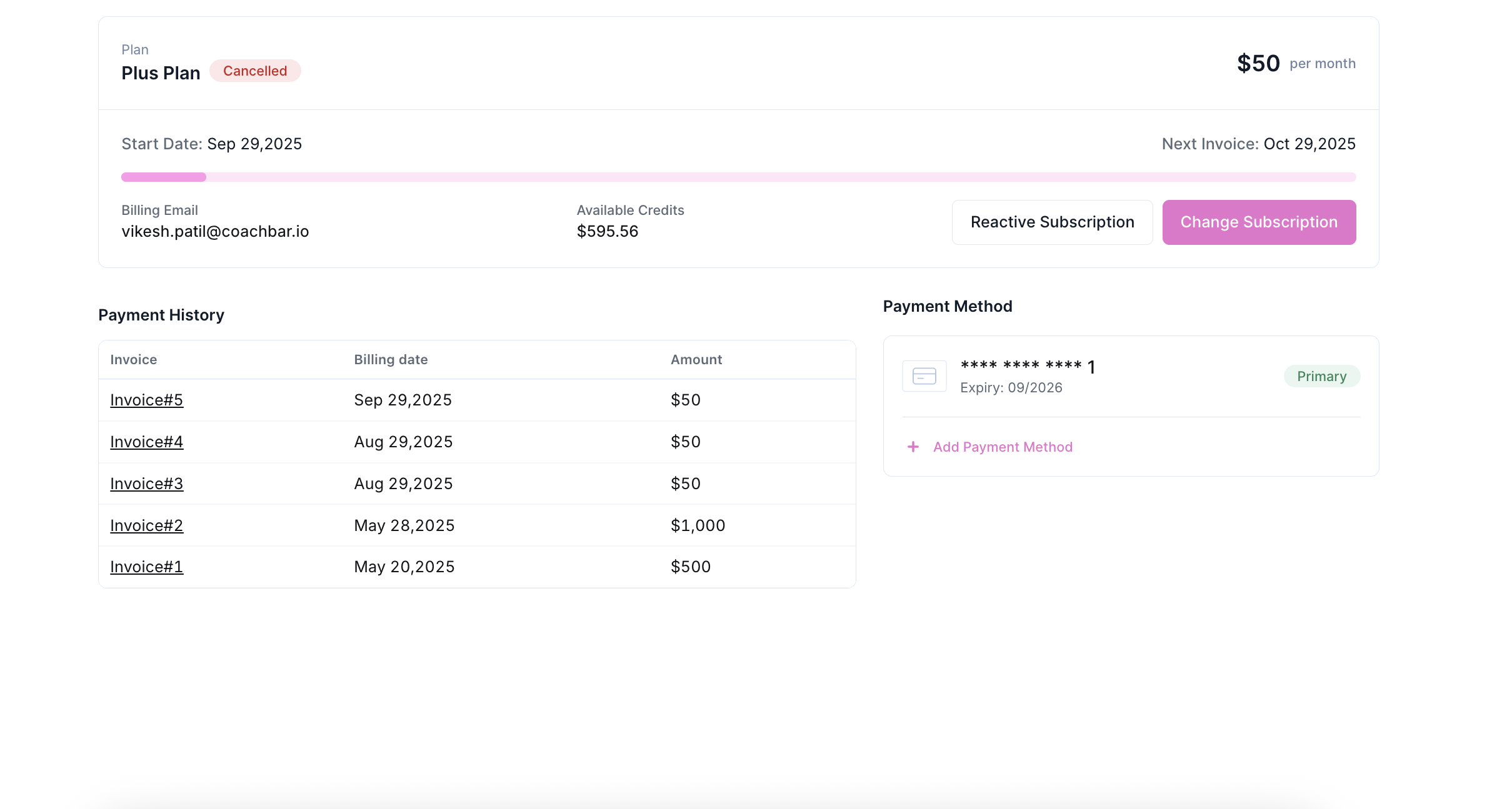
Billing Details
The Billing section displays key information including:
- Billing Email: The designated address that receives invoices and renewal alerts.
- Payment Method: Currently supports credit card payments. Payment details can be updated anytime to avoid failed transactions.
- Payment History: A chronological log of completed payments for financial review or reconciliation.
Renewal Settings
By default, subscriptions renew automatically at the end of each billing cycle.
Auto-renewal can be managed from the Subscription page to align with internal billing or budgeting policies.
Custom Enterprise Plans
Enterprise plans under both Business and Advisor categories are designed for organizations requiring flexible terms, larger-scale integrations, or tailored feature sets.
Since pricing and features are customized per client, these plans display a "Contact Us" button instead of an Upgrade Now option.
Selecting this opens a direct support channel to collaborate on a customized pricing model that fits organizational requirements.
Usage Recommendations
To ensure uninterrupted service and accurate billing:
- Keep billing and payment details up to date.
- Review renewal settings regularly.
- Evaluate current usage and plan suitability before each billing cycle.
- Use Upgrade Now or Contact Us options to optimize your AppVentory subscription according to the specific need.
If you need further assistance, please contact our dedicated customer support team at support@appventory.com, who will assist you with anything else you need. We take pride in providing exceptional service experiences, and our commitment to client satisfaction is at the heart of everything we do.