Overview
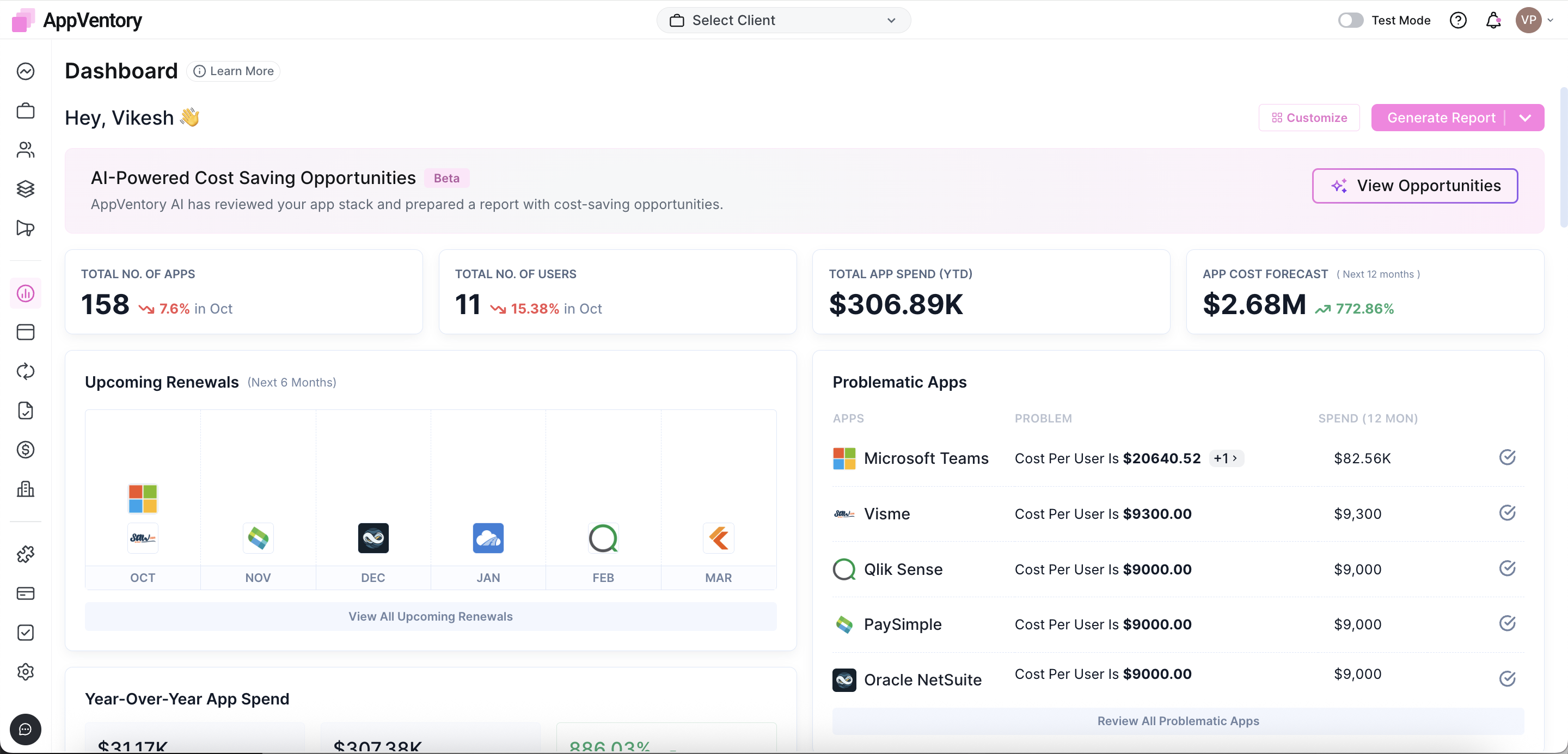
The Dashboard under the My Business section provides a centralized overview of real-time metrics, actionable tasks, and survey management tools. It now includes interactive widgets that allow direct actions, such as resolving flagged app or usage issues. A new overlapping feature tracker highlights applications with redundant functions, enabling smarter consolidation and cost decisions.
| Want to learn more? Our Academy offers a comprehensive course to help you master this topic. Access the course here: AppVentory Academy |
Key Components
1. Application and User Metrics
- Total Number of Apps
Displays the total applications detected or added within the organization.
- Total Number of Users
Reflects the total number of users engaging with any apps through identity integrations.
- Total App Spend (YTD)
Display the total cumulative spend on all apps year-to-date (YTD). This value is used as the basis for calculating forecasts and analyzing cost trends across the organization.
2. Cost and Forecasting
- App Cost Forecast
This widget projects future app-related expenses. The forecast is based on an app's historical spending data from the last 15 months, which helps. identify spending patterns and trends over time.
How the Forecast is Calculated
The system applies a Compound Monthly Growth Rate (CMGR) formula to determine the average month-over-month change in spend. This growth rate is then used to project future costs for the next six months.
The 15 month window is intentionally used to balance recency and reliability, it captures enough data to reflect seasonal or usage based variations while avoiding distortion from older or outdated pricing structures.
The forecast updates dynamically each time the dashboard is accessed. Costs for deleted or removed apps are not included in this calculation.
As the team continues refining forecasting capabilities, improvements are being developed to enhance the accuracy and relevance of these projections, particularly for apps with irregular or infrequent spending patterns.
Advanced forecasting logic now supports both linear and Compound Annual Growth Rate (CAGR) based projection models within the App Spend Report, improving financial accuracy and scenario flexibility.
3. New and Unreviewed Apps
- New Identified Apps
Lists newly discovered apps pending ownership or categorization.
- Apps to Survey
Contains apps requiring user feedback. Surveys help access user satisfaction, necessity, and application value.
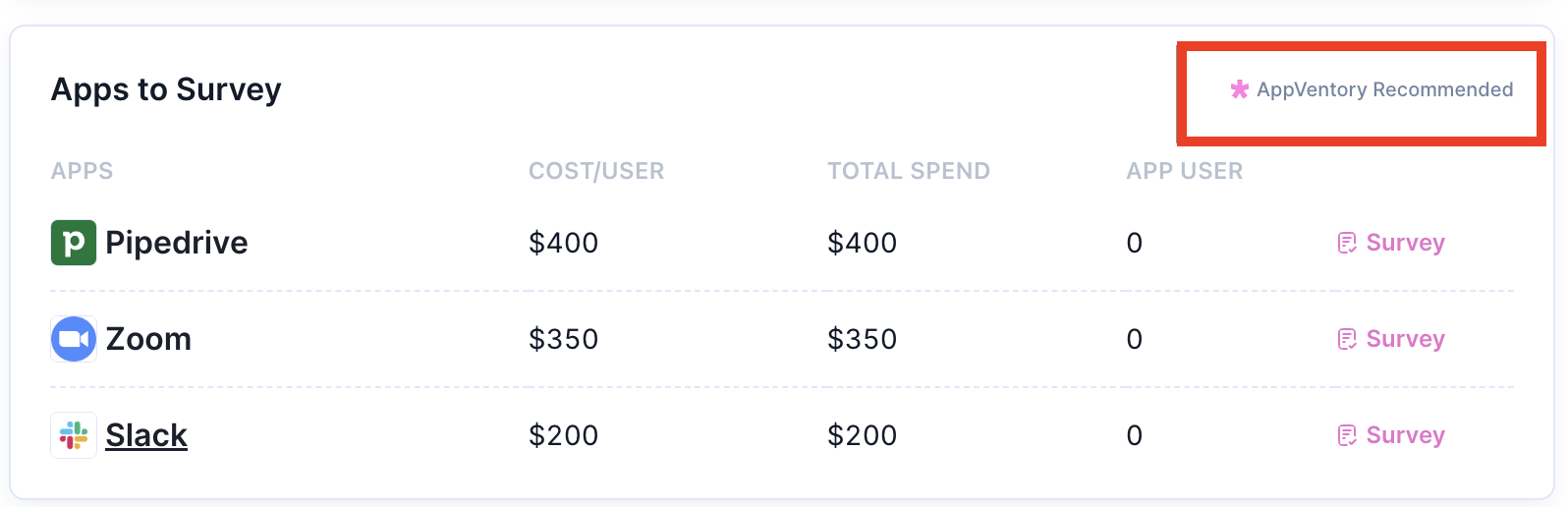
The "AppVentory Recommended" displays the Top 3 apps based on Cost per User.
4. Overlapping Feature Tracker
Identifies apps with duplicate or overlapping functionalities using visual indicators. Supports IT and procurement teams in reducing redundancy and optimizing application portfolios.
5. Interactive Widgets
Widgets on the dashboard now support direct such as assigning ownership, launching integrations, or initiating surveys without leaving the page. Enhances responsiveness and workflow efficiency by minimizing navigation.
Surveys
Survey Button
Clicking the Survey button launches the Survey Builder. The survey process is structured into four sequential stages:
1. Overview
Enter basic details of the survey (e.g., title, purpose, target apps).
2. Survey Design
Configure survey questions. Include multiple-choice, rating scales, or open-ended formats.
Use this to capture user feedback about functionality, usability, or business value.
3. Panelists
Select users or departments responsible for providing feedback.
Often includes app users, departments heads, or IT stakeholders.
4. Review
Final check before sending. Once saved, the survey is automatically listed in the Apps to Survey section.
Action Item
A task manager for administrative actions across apps and integrations. Selecting View All Tasks reveals a full task list dynamic action buttons .
Available Actions
- Integrate
Opens the Integrations page from General Integrations.
Used to connect with external systems.
- Identity Providers: Link systems like Okta, Azure AD for Automatic user discovery.
- Accounting Software: Connect tools like QuickBooks or Xero to pull in spend data.
- Email Providers: Configure systems such as Gmail or Outlook for automated communications.
- CRM: Import customer details from tools like Salesforce to correlate app usage and customer data.
- Review
Redirects to the Transactions page.
Enables assesment of individual or grouped financial records associated with apps.
- Assign
Leads to the Apps without App Owner page.
Assign responsibility for unmanaged or orphaned apps.
Typically used by IT or procurement to ensure accountability.
- Invite
Opens Settings User Management.
Used to invite users to the platform and assign them roles.
Requited fields include user emails, role, and department.
- Survey
Displays all ongoing or completed surveys from the Apps to Survey section.
Additional Dashboard Widgets
- App Usage by Department
Visualizes app usage segmented by departments.
Helps identify over/ under-utilization and plan budget reallocation.
- Upcoming Renewals
Lists apps with approaching subscirption deadlines.
Used to trigger renewals, cancellations, or vendor negotiations.
- Problematic Apps
New visual widget identifies performance concerns based on customizable parameters such as user dissatisfaction, usage decline, or integration failures. Enables quick identification and resolution of app-related issues directly from the dashboard.
- Overlapping App Detection (Beta)
Detects apps with similar or duplicate functionality using AI-powered analysis. Provides consolidation suggestions to reduce cost and redundancy. Detected overlaps are visually flagged and linked to suggested savings actions.
- App Spend by Month
Month-wise breakdown of app expenditures.
Useful for budget planning and anomaly detection.
- Year-Over-Year App Spend
Yearly trend analysis of app-related spending.
- App Spend by Category
Groups spend based on functional or departmental classification (e.g; HR, Marketing, DevOps).
- Customizable Widgets
Drag, drop, and organize widgets based on business priorities. Widget positions persist across sessions, enabling users to personalize their dashboard layout for faster access to relevant metrics.
Feedback and Ratings
Clicking Review All Surveyed Apps opens the Surveypage.
Provides access to collected feedback, responses rates, and sentiment summaries.
- Supports data-driven decision-making about application retention or decommissioning.
Apps Overview and Organization Sentiments
- Apps Overview
A consolidate display of all apps with relevant metadata including usage, cost, owner, and status.
- Organization Sentiments
Aggregates survey feedback to reflect general sentiment towards specific apps or vendors.
Referrals
Displays the status summary of the Refer a Friend credit program. It includes the count of invitations sent, accepted, or pending. This widget helps track referral history and rewards.
- Refer to the Invite History for detailed status breakdown.
Field-Specific Guidance
In task creation forms or survey setup, the following fields might require clarification.
- Task Title
Provide a clear, actionable name.
Example: Assign Owner to Slack or Integrate Salesforce CRM.
- Value
Context-dependent
- For survey design: Rating scale value, e.g: 1-5
- For cost forecasting:Estimated monthly or annual app cost.
- For tasks: Reflect business impact score, cost savings, or priority.
Software Financial Review Report
A new Generate Report feature is now available, allowing users to produce a Preliminary Software Financial Review Report.
This one-click report provides detailed insights into spend analysis, forecasting trends, vendor risk assessment, and optimization opportunities.
The report can be used for internal software stack evaluations and financial reviews.
The Dashboard serves as the command center for app visibility, financial tracking, feedback collection, and task execution. With features like advanced forecasting and the new Software Financial Review Report, it enables teams to maintain transparency, assign accountability, and optimize the organization's software ecosystem through timely insights and integrations.
If you need further assistance, please contact our dedicated customer support team at support@appventory.com, who will assist you with anything else you need. We take pride in providing exceptional service experiences, and our commitment to client satisfaction is at the heart of everything we do.