
What you get
A realistic picture of week one, so you know which numbers to trust early and which to leave until the data settles.
Days 1–2: connect and map
Connect your accounting platform from Integrations. Client organisations arrive under the connection; map each one to its client record so its spend lands in the right place. If you are not an admin on a client's file, send an access request.
Days 2–4: let spend settle
Transactions import and match to apps. Expect each client's Needs Review and Unmapped lists to be full at first. Clear them for your first few clients before you quote any per-app numbers.
Days 3–5: read the portfolio
Open Practice Overview and Clients. Sort by potential savings and problematic apps to find the clients with the clearest story.
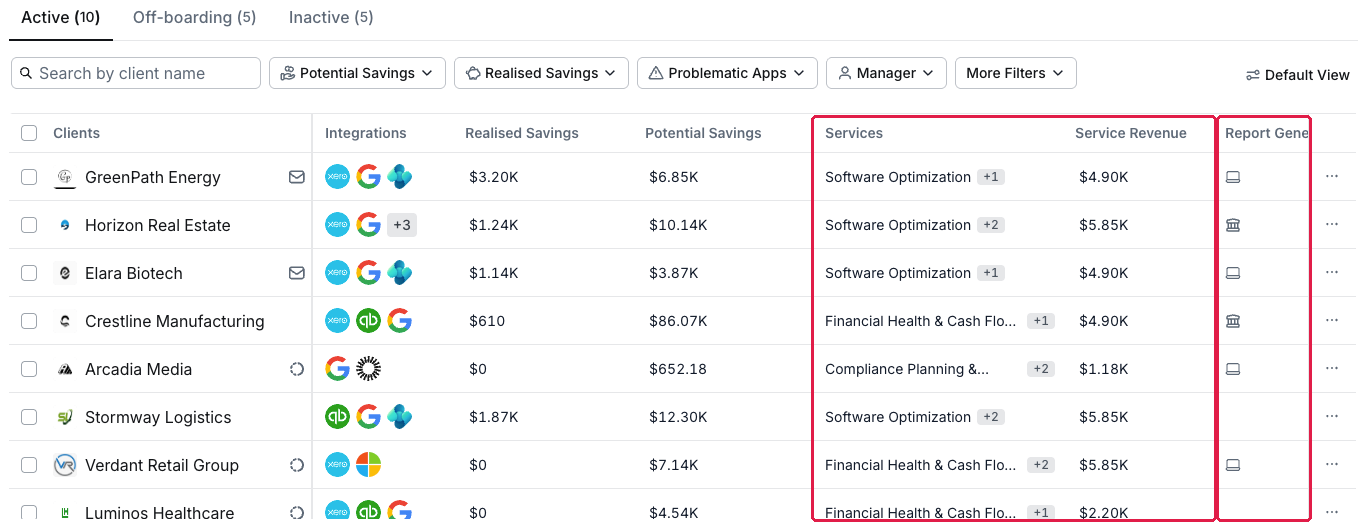
The Clients list: savings, Services and revenue per client
Worth doing while you wait
- Package what you sell in Services.
- Set your client thresholds in Settings → Practice → Problematic App Rules (the page is titled Problematic App Rules (For Clients)).
- Pick one client and preview a one-page report from their Reports tab.
What you've unlocked
You know what to expect and what to trust. Next: the quick wins below, starting with See what your clients actually spend on software.
Managing your own organisation's software? See What to expect in your first week.