.png?width=187&height=40&name=AppVentory%20Logo%20(White).png)
1. Revenue & Client Summary
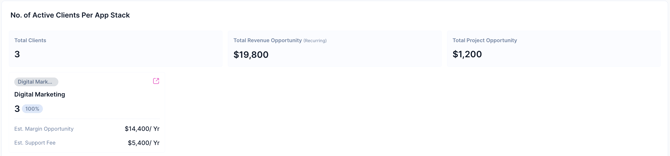
At the top of the dashboard, you can view your aggregate practice metrics:
- Total Clients: The count of unique clients currently in your AppVentory account.
- Total Revenue Opportunity (Recurring): The estimated annual recurring revenue available across your entire client base.
- Total Project Opportunity: The total one-time fees identified for implementing new apps.
2. Active Clients Per App Stack
This section displays specific service categories (e.g., Digital Marketing).
- The Service-Client Bridge: Notice the arrow icon next to the service name. Clicking this takes you to the Service-Client Bridge, a filtered view showing exactly which clients are assigned to this specific app stack.
- Metrics: It breaks down the Est. Margin Opportunity and Est. Support Fee specifically for that stack.
3. Clients Across Life Cycle
Track how your client base is moving through your practice:
- Active Clients: Clients currently receiving services. (Click the arrow icon to view the full list).
- Clients Off-boarding: Clients in the process of leaving. Tracking their "lost" margin and support fees helps analyze churn impact.
4. App Insights (Approved vs. Unapproved)
- Approved Apps: This table lists software with active vendor agreements. You can see how many clients are assigned to each and the specific "Project" vs "Recurring" revenue each app generates.
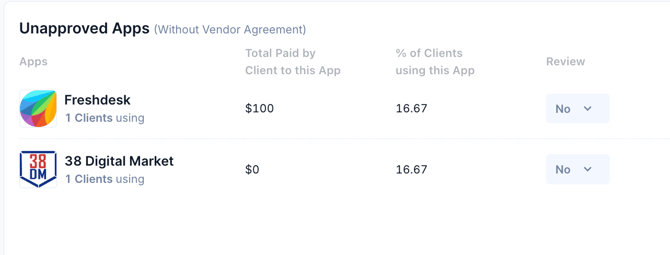
- Unapproved Apps: Highlights apps your clients are using that you haven't officially sanctioned. This is a primary source for identifying "Shadow IT" and converting it into managed service revenue.
5. Managing Your Client Base
To grow these numbers, use the Add Client button (top right), which offers four methods:
- Add Manually: Create a profile from scratch.
- Bulk Import: Download a template and upload your list via CSV.
- Integrations: Connect directly to Xero XPM, QuickBooks, FreshBooks, or Dynamics 365 to sync client data automatically.
- Invite Client: Send an email to the client to have them complete their own profile.
Financial Logic & Calculations
Based on the data in your screenshots, here is how the "Service Overview" logic calculates your practice's potential.
1. The Opportunity Calculation
The dashboard distinguishes between what you are currently earning and what you could be earning.
|
Metric |
Calculation Formula |
Example (from Digital Marketing Stack) |
|
Est. Margin Opportunity |
No. of Clients × Est. Annual Margin per Client |
3 Clients × $4,800 = $14,400/Yr |
|
Est. Support Fee |
No. of Clients × Est. Annual Support Fee |
3 Clients × $1,800 = $5,400/Yr |
|
Recurring Opportunity |
Sum of all recurring app fees across stacks |
$19,800 (Total for practice) |
2. Project (One-Time) Opportunity
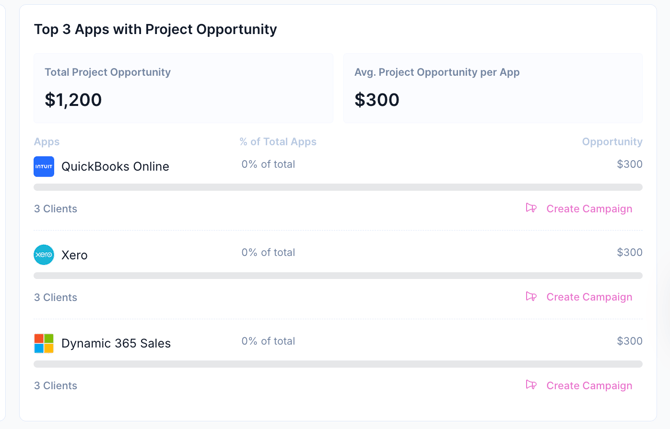
This represents the implementation of "upsell" potential for apps that are approved but not yet fully utilized by all clients.
- Logic: If Facebook has a project implementation fee of $300 and it is identified for 4 clients, the Total Project Opportunity is $1,200.
- Average Project Opportunity per App: This is the Total Project Opportunity/ No. of Apps with Opportunities
- Screenshot Data: $1,200 ÷ 4 Apps = $300 per app.
3. Top 3 Apps with Recurring Revenue Opportunity
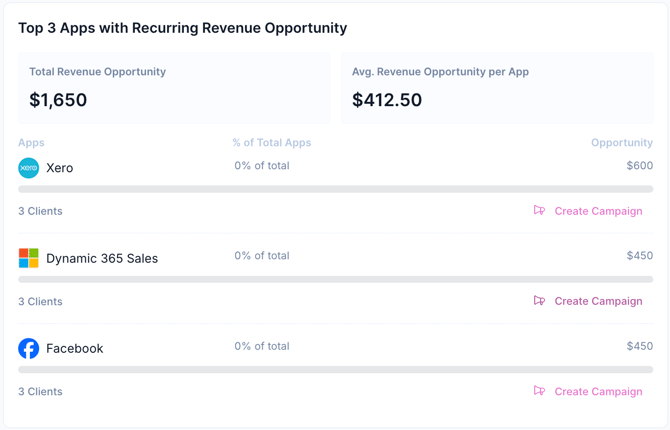
This section calculates the potential annual income from apps that are already approved but could be rolled out to more clients.
| App Name | Calculation | Individual Opportunity |
| Xero | 3 Clients identified $\times$ Monthly fee | $600 |
| Dynamic 365 Sales | 3 Clients identified $\times$ Monthly fee | $450 |
| 3 Clients identified $\times$ Monthly fee | $450 | |
| Total (Top 3) | Sum of above | $1,500 |
-
Total Revenue Opportunity ($1,650): This is the sum of all approved apps, not just the top three.
-
Avg. Revenue Opportunity per App ($412.50): Total Revenue Opportunity ($1,650) ÷ 4 Apps = $412.50.
4. Unapproved Apps (Shadow IT)
This table identifies apps that clients pay for directly, which the practice does not yet manage.
-
Total Paid by Client: The exact amount the client spent on that app in the last 12 months (e.g., $100 for Freshdesk).
-
% of Clients using this App: Clients using this app ÷ Total Active Clients × 100
-
Calculation: 1 Client ÷ 6 Total Clients = 16.67%
-
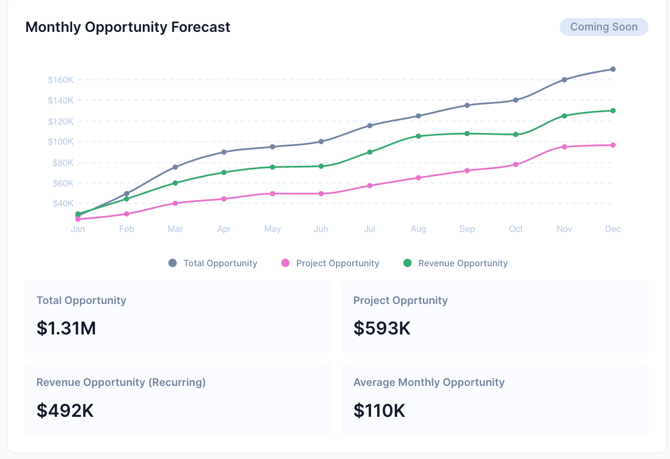
5. Monthly Opportunity Forecast
This chart aggregates the Project and Recurring opportunities to show the growth trajectory of your practice if all identified opportunities are captured by year-end.
- Total Opportunity: Project Opportunity+Recurring Opportunity
- Average Monthly Opportunity: Total Annual Opportunity ÷ 12
- Screenshot Data: $1.31M÷12 = $110K per month. (approximately)
The Service Overview acts as the main hub for practice growth. This dashboard connects client app usage with available services to turn data into clear revenue. Identifying unapproved apps and tracking the client life cycle helps scale advisory work. Monitoring Margin and Project Opportunities shifts the practice from basic support to a proactive, value-driven model for every client.
If you need further assistance, please contact our dedicated customer support team at support@appventory.com, who will assist you with anything else you need. We take pride in providing exceptional service experiences, and our commitment to client satisfaction is at the heart of everything we do.