
What you get
A renewal recommendation the client can act on: keep, reduce, renegotiate or replace.
The four numbers to bring
- Renewal price and date
- Change against last year
- Seats paid for against seats used
- Cost per user
Ask the AI assistant
On the client's Renewals tab, click Analyze on the row. AppVentory analyses usage and cost and suggests what to do. See Get an AI recommendation on a client renewal.
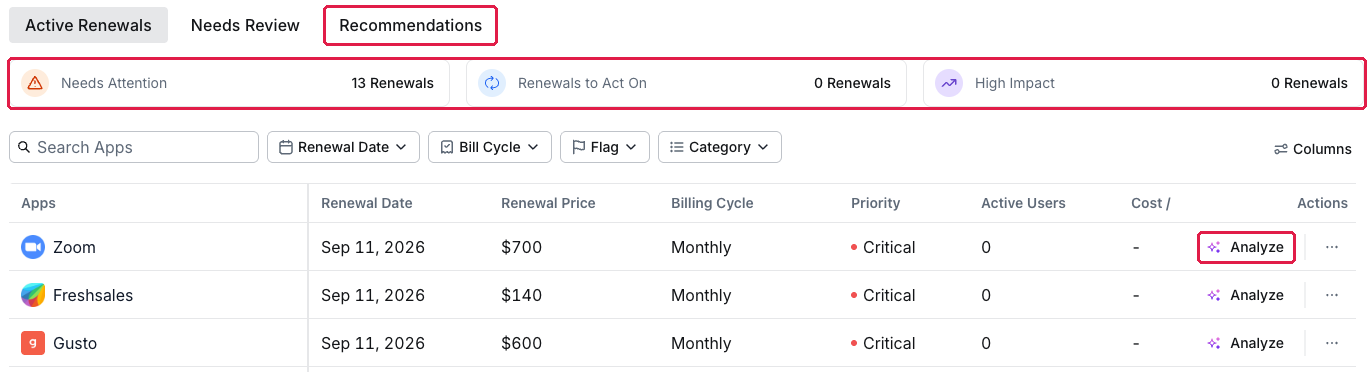
Analyze on a client renewal
Check the problems
If the row shows Needs Attention, open it to see what was detected, for example a price increase over your threshold. If the client accepts it, use Mark as Resolved Until; see Resolve a renewal problem for a set period.
The three asks
- Fewer seats, based on usage
- Annual instead of monthly, if Payment Optimization shows a saving
- A price hold, if the increase is over your threshold
Record what happened
Add a note on the client's Notes tab and update the renewal details. See Record what happened at renewal.
What you've unlocked
A renewal conversation that is advice, not admin.
Managing your own organisation's software? See Prepare for a renewal conversation.