
What you get
Licences each client can cut or reassign, backed by access and activity data rather than guesswork.
Two places to look
- Off-boarding Leakage (in the client's Cost Savings) — people who have left but still hold licences. Needs the client's identity provider.
- Apps Utilization (client record → Apps Portfolio) — current staff with little or no activity. Needs the identity provider and the browser extension.
Steps
- Open the client's Off-boarding Leakage and work down the list by saving.
- Mark each one Mark as Reclaimed once the client removes the licence, or Create Task to follow up.
- Open Apps Utilization, pick an app and a Period, and read the Verified Usage tiles: Adoption Rate, Average Session Time and Zero Activity.
- Check the coverage line under the tiles, for example 1 of 3 users has usage tracking enabled, before drawing conclusions. Send Reminder nudges the rest.
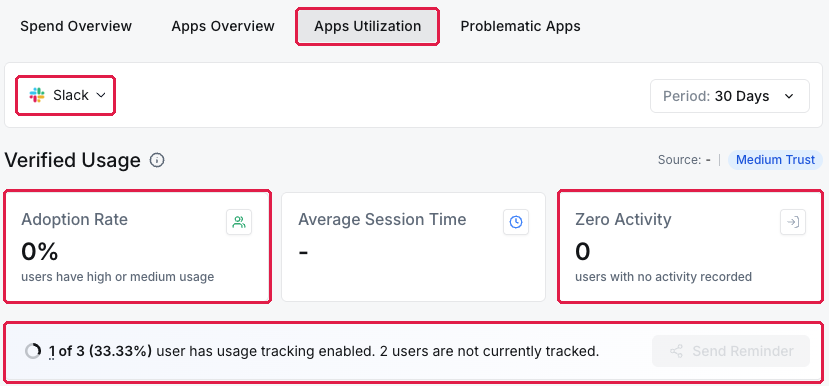
A client's Apps Utilization: adoption rate, zero-activity users and extension coverage
Reading the numbers fairly
If only some of the client's team have the extension, usage looks lower than it is. Recommend cutting seats only where coverage is high or the person has left.
What you've unlocked
A licence recommendation for this client. Next: Find client apps worth a second look.
Managing your own organisation's software? See Find unused and underused licences.