
What you get
Every renewal for the client dated and priced, so it shows up in alerts, the Agent feed and reports.
Steps
- Open the client's record → Renewals → Needs Review.
- Start with the most expensive apps.
- Use the + in each missing field to add the renewal date, price or billing cycle.
- Rows with a Billing Cycle of Unknown need the cycle first — monthly, quarterly or annual.
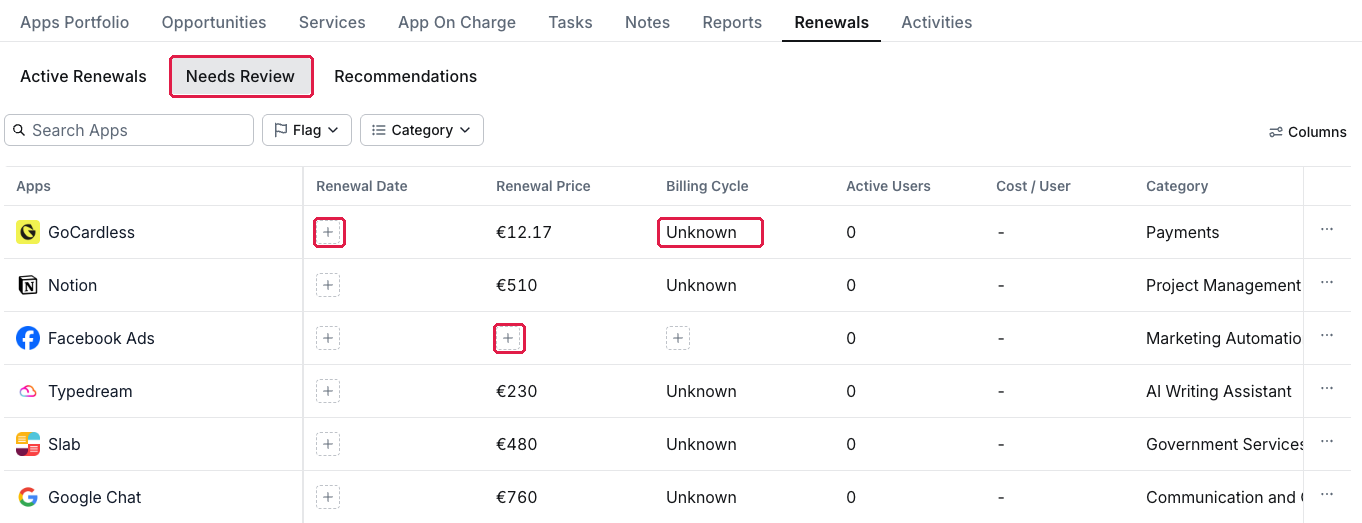
A client's Renewals → Needs Review
The same list appears inside the client's workspace under Renewals → Needs Review.
Where to find the date
The client's contract or last invoice, the vendor's billing page, or the client's admin. Ask the client for a list of annual contracts once; it fills most gaps in one go.
Why the billing cycle matters
Without it, AppVentory cannot predict the next renewal or compare annual and monthly pricing.
What you've unlocked
Complete renewal data for this client. Next: Set renewal alerts and reminders across your clients.
Managing your own organisation's software? See Fill in missing renewal data.