.png?width=187&height=40&name=AppVentory%20Logo%20(White).png)
Want to learn more? Our Academy offers a comprehensive course to help you master this topic.
Access the course here: AppVentory Academy
How the Integration Works
- AppVentory-generated emails are routed through SendGrid infrastructure
- Setup requires a Full Access API key generated in SendGrid
- Sender Email is selected during configuration
- Activation ensures all outbound emails use the configured domain and sender
- Integration settings are accessible via the gear icon for status monitoring and deactivation
Step-by-Step Integration Process
Step 1: Access SendGrid Integration
- Navigate to SendGrid Integration within AppVentory
- Click Connect Now
- Click Connect on the setup page
Step 2: Generate SendGrid Account
- Access SendGrid platform
- Select Sign Up Now
- Complete account creation using Google or email
- Verify account via phone authentication
- Provide required details including name, email, and organization
- Complete onboarding setup
Step 3: Create API Key
- Navigate to Settings > API Keys in SendGrid
- Click Create API Key
- Assign a name to the key
- Select Full Access under permissions
- Click Create & View
- Copy API key immediately
Step 4: Complete Integration in AppVentory
- Return to AppVentory integration screen
- Paste API key into designated field
- Select Sender Email from dropdown
- Click Activate
Step 5: Manage Integration Settings
- Access settings via gear icon
- Available options include:
- View activation status
- Deactivate integration
Integration Capabilities
Supported Functionality
- Routing of all AppVentory emails through SendGrid
- Use of custom domain and sender email for branding and deliverability
- Display of configured sender in campaign creation
- Email routing during client creation (manual entry, bulk upload, CRM integration, self-onboarding)
- Visibility into message logs, delivery confirmations, and Application Activity metrics
- Investigation of undelivered emails via SendGrid Activity tab
Limitations & Restrictions
- Outbound-only integration; no inbound email processing
- No synchronization of SendGrid contacts, templates, or campaigns
- Only one email integration active at a time (SendGrid or Mailchimp)
- Full Access API key required for setup
- Limited analytics within AppVentory; detailed insights available in SendGrid
Integration Outcomes in AppVentory
- All outbound emails use configured sender email and domain
- Default support@appventory.com address is replaced
- Communication appears organization-branded
- Delivery tracking available via AppVentory dashboard and SendGrid
Campaign Creation
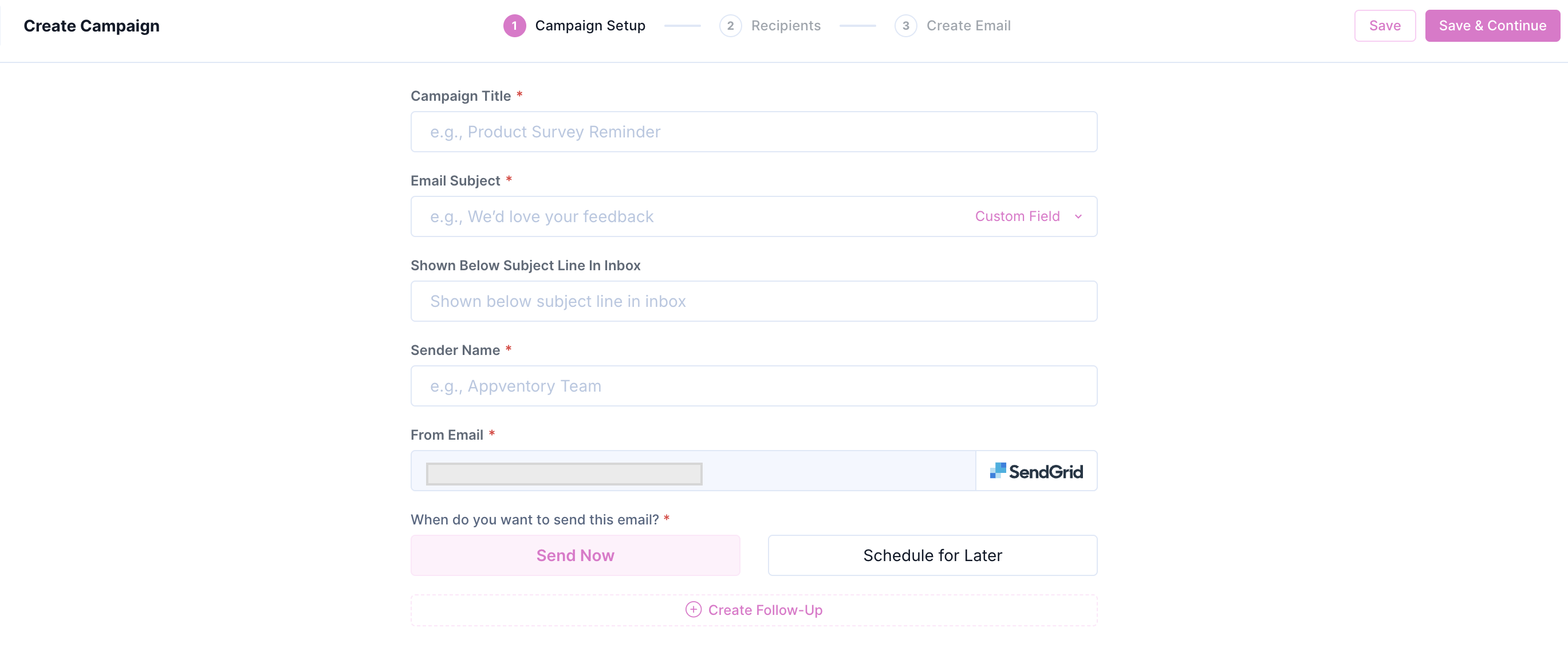
- From Email field reflects SendGrid configuration
- Example format: email@domain.com via SendGrid
- Confirms active integration during campaign setup
Client Management
- Email delivery during client creation routed via SendGrid
- Applicable for:
- Add Manually
- Bulk Upload
- CRM Integration
- Self-Onboarding
- Dashboard visibility includes:
- Message request logs
- Delivery confirmations
- Application Activity statistics
Data Extracted & Synchronized
|
Data Source |
Destination in AppVentory |
Usage |
|
Verified sender identities |
Sender Email dropdown |
Branded outbound email |
|
API key (Full Access) |
Integration configuration |
Authentication |
|
Delivery confirmations / logs |
Dashboard / Application Activity |
Delivery tracking |
|
Outbound emails |
Sent via SendGrid |
Scalable delivery |
Data Not Extracted
- SendGrid marketing contacts, audiences, templates, or campaigns
- Inbound email data
- Detailed engagement analytics beyond AppVentory metrics
Security & Data Handling
- Authentication via API key generated in SendGrid
- API key can be revoked at any time
- Email delivery handled through monitored SendGrid infrastructure
- Delivery issues auditable via SendGrid Activity tab
Key Benefits
For Businesses
- Branded system emails improve trust and open rates
- No requirement to maintain internal mail infrastructure
- Reliable delivery with visibility into communication status
- Common use cases include surveys, onboarding, and notifications
For Advisors & Accountants
- Client communication reflects firm branding
- Campaign delivery supported with message-level visibility
- Onboarding invitations tracked end-to-end
- Undelivered emails diagnosed quickly using SendGrid tools
SendGrid integration enables secure, branded, and scalable email delivery for all AppVentory system communications. Centralized tracking, improved deliverability, and simplified infrastructure management support efficient campaign execution, onboarding, and ongoing client engagement.
If you need further assistance, please contact our dedicated customer support team at support@appventory.com, who will assist you with anything else you need. We take pride in providing exceptional service experiences, and our commitment to client satisfaction is at the heart of everything we do.